• Home
  • About
  • Middle School ELA Blog: Lit with Lyns
  • Shop
  • Contact
    • Email
    • Facebook
    • Instagram
    • Pinterest

Lit with Lyns

Among Us in the Classroom – Incorporating Topics Students LOVE

differentiation· digital activities for middle school ELA· digital learning· edtech· ELA

Among Us in the Classroom | Incorporating Topics Students Love Save
 

Like many of you, my school district was 100% virtual the first couple of months of school. I didn’t realize how hard it would be to form relationships with students through a screen. We’re now taking the hybrid route where the majority of students chose to return to face-to-face learning. There are a few attending online at the same time via Zoom. This is where Among Us in the Classroom & Incorporating Topics Students LOVE came into play.


How the Game, Among Us, Works

If you aren’t familiar with this (I wasn’t), it’s a multiplayer game where players are assigned a role of either crewmate or imposter. Crewmates must decide who the imposter is while completing tasks without dying (not in a graphic or morbid way). If they think they know who the imposter is, they can discuss this via chat with other teammates. Then vote on whether or not this is the imposter. If the vote is correct, the remaining crew members win. If they’re wrong, players go back to completing tasks and trying to survive until they’re ready to vote again. 
 
The first day students returned to school in person this game was all I heard about in the halls. My own 6th grader had mentioned it, but I really knew nothing about it.  That’s when a little light bulb went off…. if my students think I’m “down” with Among Us, this will give us a connection. This is when I decided that I would create a game using a similar Among Us process that incorporated what we were currently working on in class. 
 
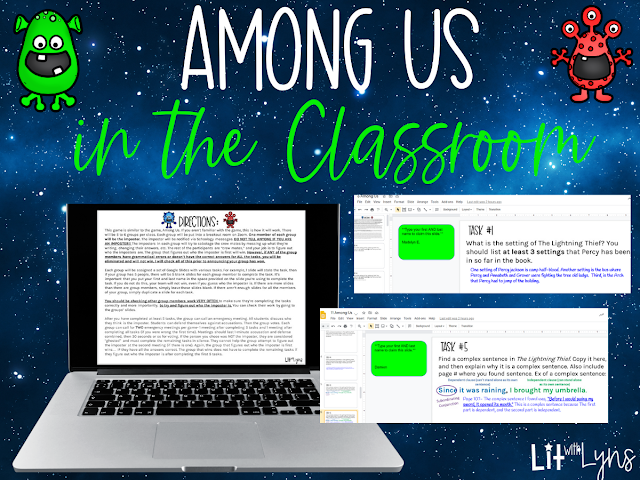
Since we’re reading The Lightning Thief by Rick Riordan, I knew including the Among Us format would need to somehow relate to this (although it could work with any subject area or skill). Ahead of time, I looked over my class rosters and put students into groups. Each group had an imposter. Since some of my students are online, I had everyone log into Zoom, then I manually put them into the groups I had decided on and put each group into a Zoom breakout room. The imposters were notified via private chat. See the directions students received below:
 

Instructions

Save
 

Among Us Craze in the Classroom Format

Each group had to complete a series of tasks. I created 10 different tasks. If there were 5 members in a group, then there would be 5 slides of each task. I put the tasks on Google Slides, and then each group was assigned a set of slides that all group members could edit. Also, I made sure to reiterate how important it was that each member put their first and last name on the slide they were using to complete the task. Although they could work together, they still all had to complete the tasks. While they were working, the imposter had to be sneaky and attempt to remove, mess up, edit their answers, etc. without the “crewmates” seeing him or her. When choosing the imposter, I made sure to choose a student who had shown leadership skills and that would be able to complete the tasks while also doing their imposter “duties.” Some of the tasks students had to complete are shown below:
 

Task Cards & Among Us

All in all, students had a blast! They didn’t realize they were actually using critical thinking skills, citing text evidence, identifying sentence structure in the meantime.

Possible Modifications

  • Ten tasks were too many to complete in a 60 minute class period. Five or six tasks would have been plenty. 
  • Since we were using Google Slides, I forgot that the group members who were working on the same set of slides could see the little profile pics of others working on the same slide as they were. This meant that the imposter had to make sure that they weren’t on the slide at the same time other members were.
  • Students could also see what group members were working on specific slides by looking at the little slides on the left. See what I’m referring to below. To prevent this, I had them tape a sheet of construction paper over this section of their screen. This game is in Google Slides since this had to be done online so that my Zoom kids could participate. I haven’t thought of an alternative yet, but my kids still did well with this. I told them not to look under their paper. Otherwise, they would be eliminated from the game and would have to complete all tasks alone. This definitely worked. 😉
Save
 

If you would like to try implementing an Among Us-ish game in your classroom, you can access the editable Google Slides I created here. You can modify the directions and tasks to fit what you’re working on in your classroom. 

Among Us in the Classroom & Incorporating Topics Students LOVE made such a difference in the atmosphere in the classroom. I also created a printable and digital Among Us Informational Text that includes a quiz and other activities. This was a big hit in my classroom as well as other teachers who have used it. You can also save 20% by purchasing this in the Informational Texts Reading & Writing Bundle!

What fun activities have you used in your classroom this year? I’d love to hear about them in the comments. 

Save
« Teaching Virtually AND Face-to-Face | 4 Ways to Make It Work
ELA Christmas Activities & FREEBIE for Middle School »

Search

Categories

Latest on Instagram

Copyright © 2026 · Becca Paro Design Co.