Would you agree that we’re all thinking the same thing when it comes to going back to school? If you have any of the following questions, you’re in the right place:
- What distance learning resources can I implement that will NOT overwhelm my students or me as their teacher?
- How do I keep my students engaged through distance learning?
Like many of you, in Georgia, our last day of school before starting distance learning was Mar. 13th. We all felt like we had literally been dropped into the center of The Hunger Games and were expected to make it all work…somehow. I realize that many schools aren’t 1:1 where every student works daily on some type of device and knows exactly how to login to whatever educational learning platform your school uses. Some things are completely out of our control, but what we can control are the activities and lessons we do that will keep your students engaged.
There were 3 digital learning tools that saved my life (and sanity) during distance learning:
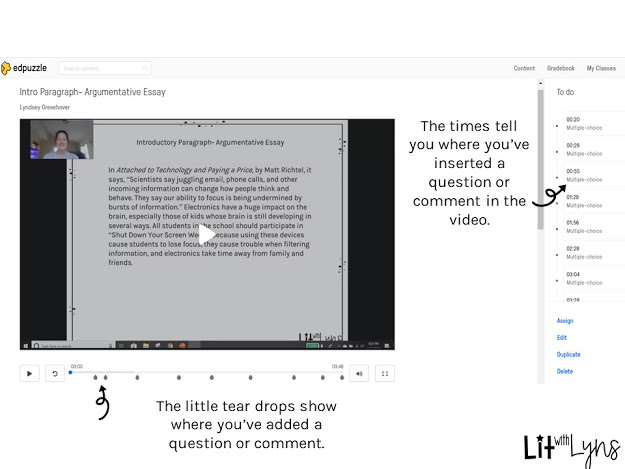
Edpuzzle is an easy to use, FREE video platform that allows you to turn any video into a lesson. Using Edpuzzle, you can choose videos from YouTube, Khan Academy, Ted Talks, National Geographic, and more. You can even upload your own videos! Once you’ve chosen your video, you can add questions, comments, and even add your own voice with a voice over to the video. Kids LOVE videos, so they’re more engaged and much more willing to do than the “read the story and answer the questions. I’ll actually be presenting on how to use Edpuzzle in detail in the ELA classroom at the Simply Coaching Summit. Get more info on that here.
Depending on the skill we were working on, I was able to search from the thousands of videos on Edpuzzle (including those I had made) and assign the lesson to my students via Google Classroom, or you can share the link from your class website or whatever LMS you use.
For detailed directions on how to use Edpuzzle, check out this blog post I wrote previously. Here’s an example of an Edpuzzle lesson I created using my “How to Write a Strong Intro Paragraph” video.
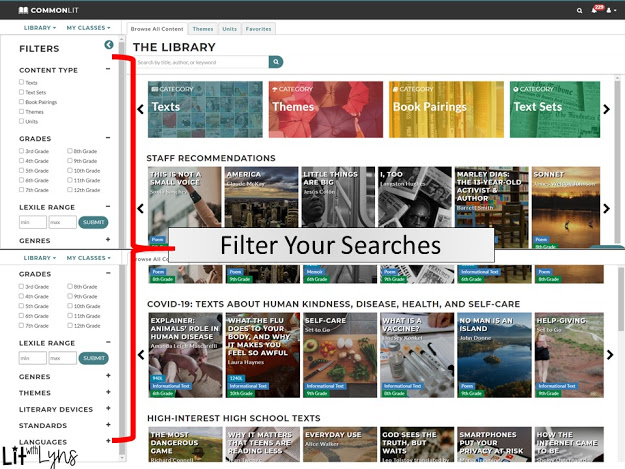
Commonlit.org is an AMAZING and FREE website full of digital texts from every genre. Perfect for the flipped classroom and/or distance learning, and students can definitely find a text to read that is of interest to them! When searching for a text, you can filter searches by content type, grade, lexile level, genre, them, standards, and even languages! I blogged about all the ways that Commonlit can be used in a previous post.
One assignment I did was to assign several texts that covered a broad range of my students’ interests. They could choose 2 or 3 of the assignment to complete, based on what they found appealing.
Before we left school in March, we were working on a unit about refugees. Since I didn’t have access to enough books for every student, I had to find an alternative while sticking with the same topic. This is where Commonlit came into play. Using the many search filters available on Commonlit (see all filter options below), I was able to find texts- both fiction and non-fiction- that related to this topic.
My favorite distance learning resource is digital escape rooms! My students LOVE them, and they’re always begging for more! This is why I started creating them. What I love about digital escape rooms, is that you don’t have to purchase the locks and other accessories that are often required of a regular escape. To be completely honest, they’re not hard to create. Check out this blog post about creating a digital escape in minutes.
Since we will be going back to school (in some form) in the near future, I have a Digital Back to School Escape Room that I use every year.
There are 3 “rooms” that students are required to escape:
✅Escape Room #1– Students will complete a survey using Google Forms that asks questions about their likes, dislikes, areas they do well/struggle in, how well they understand and can use technology, and more.
✅Escape Room #2– Tips for Being Successful- Students will watch a video that provides tips on how they can be successful throughout the school year.
✅Escape Room #3- Students will watch a video on goal setting, where they will be walked through the steps of setting SMART Goals.
What distance learning tools did you use that worked well? What questions do you have about distance learning that I may be able to help you with? I’d love to hear about them in the comments below!

