• Home
  • About
  • Blog
  • Shop
  • Contact
    • Email
    • Facebook
    • Instagram
    • Pinterest

Lit with Lyns

8 Reasons CommonLit is a MUST for ALL Subject Areas

blended learning· differentiation· edtech· Uncategorized

8 Reasons to use CommonLit Save

If you haven’t been using this amazing edtech tool, here are 8 reasons why you should use Commonlit in the classroom! As a teacher and a daily integrator of technology, I’m always on the lookout for ways to enhance my classroom’s access to texts.  When I discovered CommonLit, I felt I had truly hit the jackpot!  If you’re not familiar with this amazing, FREE tool, it’s a digital library of leveled texts.  You can find anything from news articles, texts about specific people, poems, short stories, and historical documents…. the options are endless!

In addition to being completely FREE, here are 8 reasons why CommonLit is a must have in the classroom:

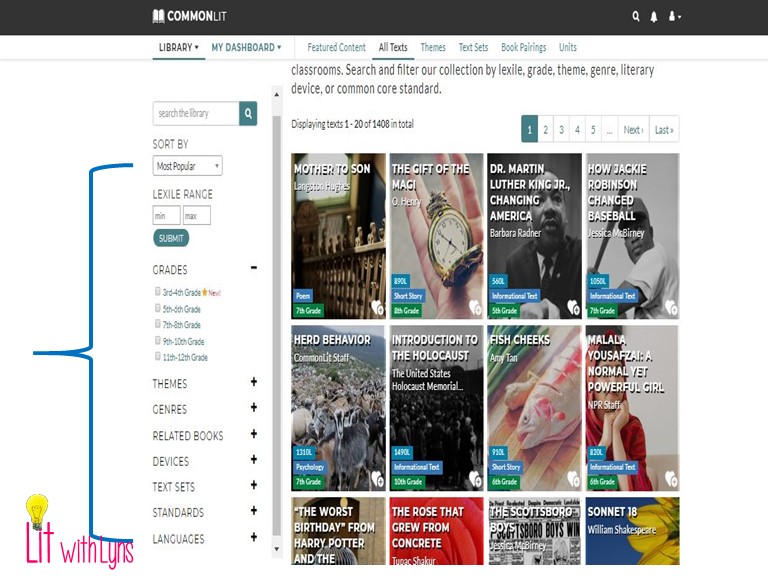
1.  Great Search Filters 

Commonlit pretty much takes the cake in the way of offering practically every filter option you would want!  When looking through their library, you can filter your search by Lexile Level, grade, genre, theme, literary device, standards, and even languages! 
Save

2.  Easily Differentiate

I’m ALWAYS on the lookout for ways to differentiate, particularly with technology.  Any time I find a tool that allows for differentiation, I do my best to share it with everyone I know.  Commonlit makes differentiation EXTREMELY EASY!  Teachers can use the guided reading format, which breaks the texts into chunks.  Guided questions are ungraded questions that students are required to answer if the guided reading mode is being used. The student can’t move forward with reading the text until they get the question right.  Students also have the option to have the text read aloud to them.  Even better, the teacher doesn’t have to assign the guided reading mode to the whole class.  Also, you can choose specific students who would benefit from this, such as struggling readers or English Language Learners.


3.  Easily Annotate the Text

Using the highlight feature, you can have students highlight the main idea, words they don’t know, textual evidence… whatever is beneficial for your students.  If they make a mistake, they can easily fix it with the eraser tool.


4.  Paired Text & Related Media

The majority of the texts come with paired texts and related media options.  The paired text includes a brief explanation of how the article/story relates to the one you originally chose, as well as suggestions for use.  I’m a little obsessed with the related media option because this saves me from having to find additional ways to encourage critical thinking.  The videos come from Ted Talks, Youtube, and more.
 
Save

5.  View Analytics on Assignment Report

Each text typically includes several types of questions: guided, assessment, discussion, and short response.  The teacher can choose which type they would like students to answer.  If you assign the assessment questions, the multiple choice is automatically graded for you.  The scores will appear on the assignment report.
 
Save

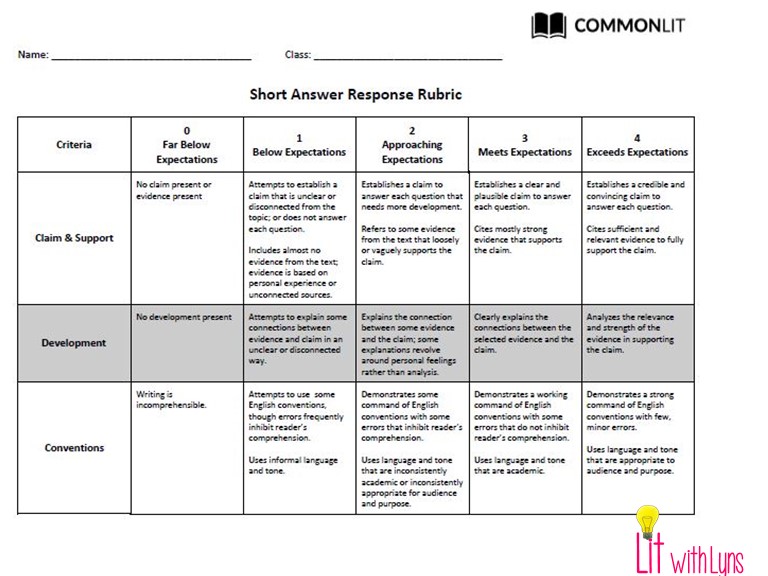
6.  Easily Implement Writing with Short Responses

The last discussion question is usually the short response.  This is a great way to have students use evidence from the text to support their answer.  Short responses are the only part teachers have to grade on their own.  CommonLit has an awesome 4 point rubric you can use to do this.  
 

Save

7.  Assign Text to Specific Student or Group

CommonLit has a special feature that allows you to assign a text to specific students, rather than assigning it to the whole class.  If you have students who need extra help or are out sick for several days, you can assign texts just to that individual.  You can also assign certain texts to specific groups.  For example, let’s say you’re doing a unit based around the theme Family and Friendship. You have assigned each group to a certain topic related to this theme.  You can then assign each group to a text that would apply to their given topic.  It’s a great way to differentiate learning!
Save

8.  Flip Your Classroom

I often assign a text from CommonLit for students to read at home.  That way we can get right to our discussion questions or short response when they come into class.  If students don’t have access to the internet, you can always print a copy.  All texts come with an option to print the article/story as well as the questions.
If you would like a video tutorial on Commonlit with access to handouts that provide step-by-step directions and a differentiation template, click here.
If you use CommonLit, I would love to hear how you do so.  Tell me about it in the comments below.
« Using Edpuzzle in the Classroom Can Change Your Teacher Life
Keeping Students Engaged Before the Holidays »

Search

Categories

Latest on Instagram

litwithlyns

❤️Wife👩🏻
💙Boy Mom👦🏻👦🏻
📝MS ELA teacher
💻Curriculum Designer💁🏻‍♀️
🖥 Integrator of technology📍GA
🔗Links ⬇️

🎒✨ BACK TO SCHOOL DIGITAL ESCAPE ROOM ✨🎒Comment 𝐁𝐓 🎒✨ BACK TO SCHOOL DIGITAL ESCAPE ROOM ✨🎒Comment 𝐁𝐓𝐒, and I’ll send the link straight to your inbox. 

Looking for a fun, engaging way to kick off the school year? This Back to School Digital Escape Room is the perfect first-week activity for grades 5–8!

🔐 Students will:
✅ Complete a student interest survey
✅ Learn tips for being successful this school year
✅ Set meaningful SMART goals
✅ Work through 3 interactive digital escape rooms
✅ Practice technology skills while having fun

💻 NO PREP! Simply share the Google Forms link and let the adventure begin. No locks, cutting, or extra supplies needed!

This high-engagement activity helps you get to know your students, build classroom community, and set the tone for a successful year—all while students think they’re just having fun!

Tell me below: What’s your favorite first-week-of-school activity? 👇

#BackToSchool #MiddleSchoolTeacher #ELAteacher #TeachersOfInstagram #TeachingIdeas
Teachers and students can stay organized with plan Teachers and students can stay organized with planners and agendas! This digital and print resource comes with multiple formats of both! Comment 𝐏𝐥𝐚𝐧𝐧𝐞𝐫 and have a link sent directly to your messages. 

You will get your own link to this resource on Canva where you can duplicate slides for the year, add text, and more. 

What’s included:
* 9 daily agenda templates to choose from
* 5 weekly agenda/planner templates
* 1 monthly planner template
* 1 yearly planner template (more of a calendar with room for notes)
* Planner template for each month of the year (12)
📚 Secondary ELA teachers, this is your sign to ear 📚 Secondary ELA teachers, this is your sign to earn professional development from anywhere! 𝐂𝐨𝐦𝐦𝐞𝐧𝐭 𝐑𝐄𝐒𝐄𝐓 𝐚𝐧𝐝 𝐭𝐨 𝐡𝐚𝐯𝐞 the 𝐥𝐢𝐧𝐤 𝐬𝐞𝐧𝐭 𝐭𝐨 𝐲𝐨𝐮𝐫 𝐢𝐧𝐛𝐨𝐱! Whether you’re on the couch, in your classroom, or enjoying summer break, you can learn new strategies and connect with educators without the travel. ✨

#ELAteachers #MiddleSchoolELA #HighSchoolELA #teacherpd🌟
🚨 If your ELA classroom needs a reset… this is for 🚨 If your ELA classroom needs a reset… this is for you.
I’m so excited to share that I’ll be speaking at the ELA Reset Summit—a free, virtual event designed to help secondary ELA teachers start the year clear, confident, and not already exhausted.

🎟️𝐆𝐫𝐚𝐛 𝐲𝐨𝐮𝐫 𝐅𝐑𝐄𝐄 𝐭𝐢𝐜𝐤𝐞𝐭 by clicking link in my bio. 

📅 June 23–25, 2026
This isn’t just another PD event. It’s where you:
✔️ Reset your systems (without rewriting your entire life)
✔️ Rebuild reading + writing instruction so it actually sticks
✔️ Walk away with strategies you can use immediately

I’ll be presenting on AI That Will Reclaim Your Nights where you’ll learn how to create engaging lessons without the extra prep. 
If you’ve been craving a fresh start without the overwhelm… this is it.

#ELAteacher #SecondaryELA #TeacherPD #BacktoSchoolPrep #ELAReset
Follow on Instagram

Copyright © 2026 · Becca Paro Design Co.