• Home
  • About
  • Blog
  • Shop
  • Contact
    • Email
    • Facebook
    • Instagram
    • Pinterest

Lit with Lyns

Using Edpuzzle in the Classroom Can Change Your Teacher Life

Common Core· differentiation· digital activities for middle school ELA· edtech· Reading Comprehension· technology in the classroom

no image Save

When I discovered Edpuzzle back in 2015, I couldn’t contain my excitement!  Not only was I thrilled, but my students couldn’t get enough of this tool!  If you haven’t heard of Edpuzzle, it’s an amazing website that allows you to choose from tons of videos (including YouTube, your own instructional videos, etc.), and then you’re able to customize it by clipping, recording audio, and adding questions.  Check out this blog post, Best Test Prep ELA Test Prep Resources for more info.  Due to my excitement, I decided to become an Edpuzzle Coach, so that I could share what I’ve learned with other educators. Using Edpuzzle in the classroom is a must!

Below you will see why videos are such great resources for students to use.  They’re also a wonderful way to differentiate for all learning levels.  This is what makes Edpuzzle so great!

Save


.
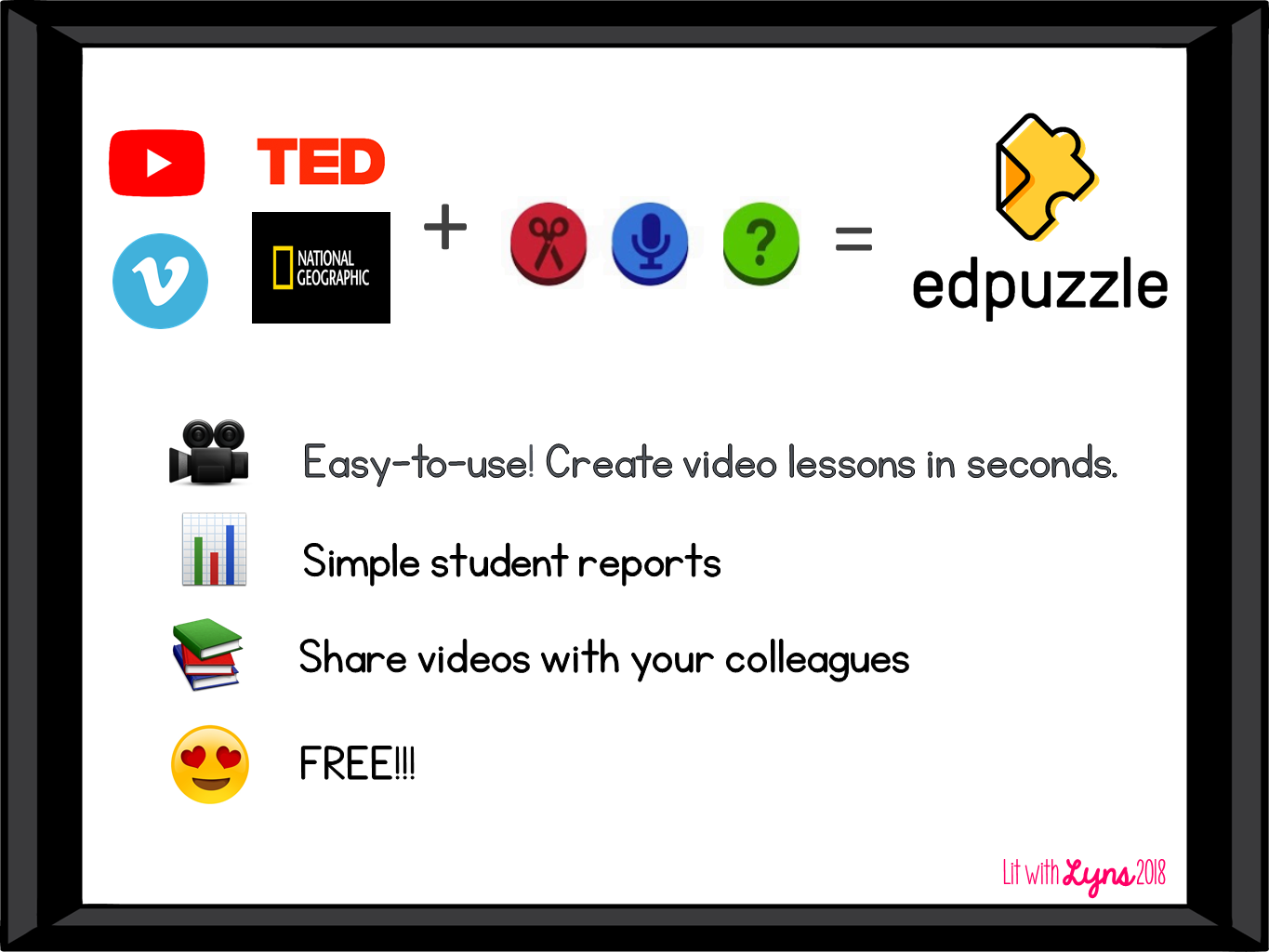
See a detailed description of Edpuzzle below:

Save


By using videos from Youtube, TedTalks, Vimeo, National Geographic and more, teachers are then able to crop the video, add oral notes, as well as questions for students to answer while watching.
 
Edpuzzle Save


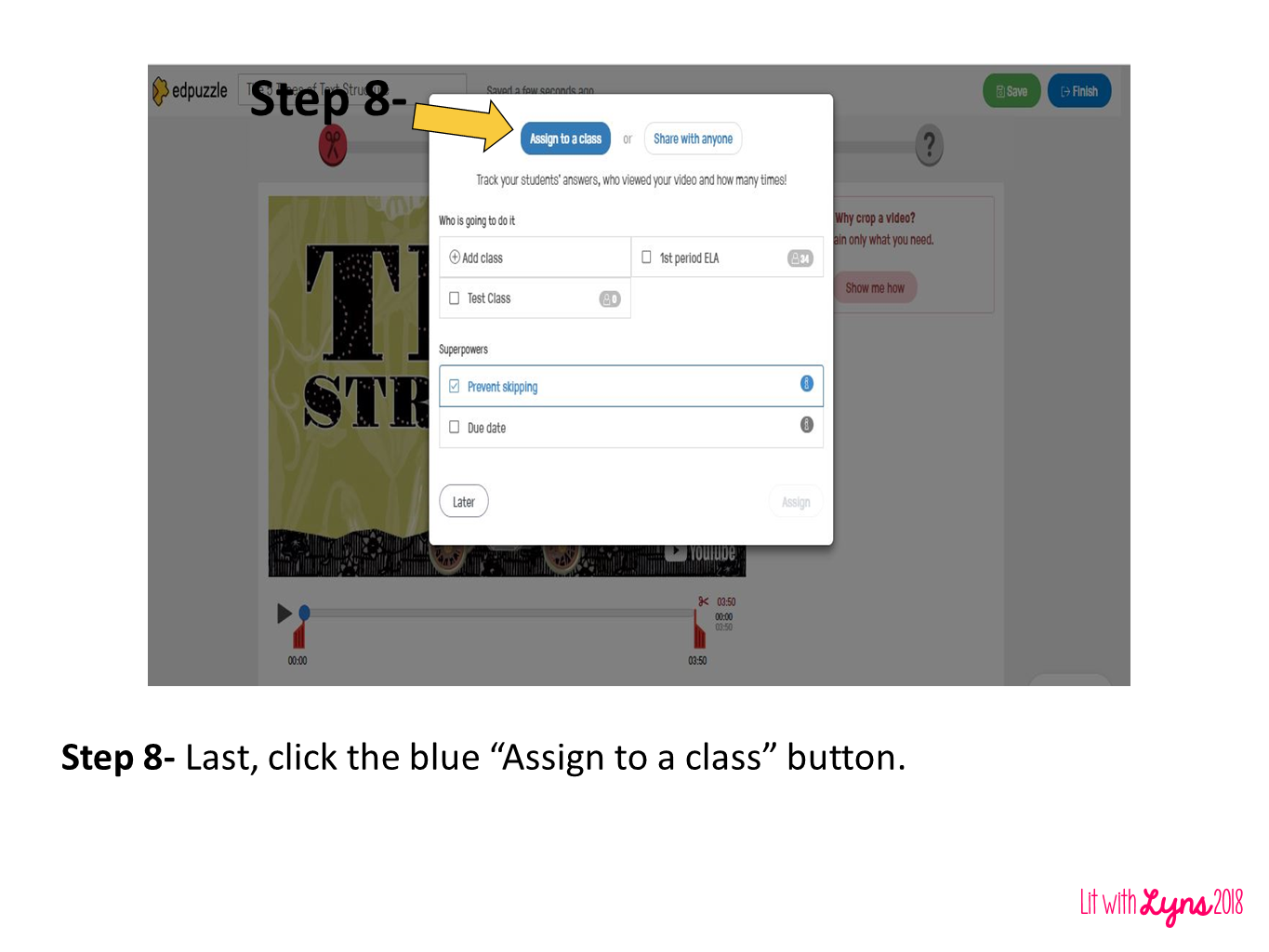
In the images below, you will see how to add classes, create video content, and then assign the videos to students in Edpuzzle:
 
Save


Save
 
 
Save
 
 
Save
 
 
Save
 
 
Save
 

For those of you who have used this program, how have you used Edpuzzle in the classroom? I’d love to hear what videos you have found helpful.

« Classroom Friendly Pencil Sharpener
8 Reasons CommonLit is a MUST for ALL Subject Areas »

Comments

  1. Lindsey says

    at

    This comment has been removed by a blog administrator.

    • Lyns says

      at

      It looks just like what you saw from the teachers’ view. You can also email me as suggested with any questions at litwithlyns@gmail.com.

  2. The Raudy Teacher says

    at

    Thank you so much! I loved the video that you provided on the Teach with Tech conference. I learned so much. I can see how this will really apply to my classroom.

    • Lyns says

      at

      I’m so glad to hear this. Thank you!!

  3. Tavia says

    at

    I'm going to get my EdPuzzles ready for math RIGHT NOW! During my daily math rotations there are usually 1-2 groups per week that I just cannot fit in the schedule to meet with me. They are usually my top performing students who don't necessarily need to meet with me every single day, but I still like to check in daily to make sure they are on track. For these situations, I always load a tutorial video from Youtube on their Google Classroom and give a short sheet of practice problems to do. I'm scraping all of that this year! I'm going to make the EdPuzzles using the SAME vidoes from Youtube, insert my questions, audio to clear misconceptions, and keep it moving! This makes it paperless, and so much better to check their progress in real-time. Thank you!!

    • Lyns says

      at

      Thanks so much! Love these ideas!

  4. kevin says

    at

    This comment has been removed by a blog administrator.

  5. Lyns says

    at

    Thanks so much!

Search

Categories

Latest on Instagram

litwithlyns

❤️Wife👩🏻
💙Boy Mom👦🏻👦🏻
📝MS ELA teacher
💻Curriculum Designer💁🏻‍♀️
🖥 Integrator of technology📍GA
🔗Links ⬇️

Teachers and students can stay organized with plan Teachers and students can stay organized with planners and agendas! This digital and print resource comes with multiple formats of both! Comment 𝐏𝐥𝐚𝐧𝐧𝐞𝐫 and have a link sent directly to your messages. 

You will get your own link to this resource on Canva where you can duplicate slides for the year, add text, and more. 

What’s included:
* 9 daily agenda templates to choose from
* 5 weekly agenda/planner templates
* 1 monthly planner template
* 1 yearly planner template (more of a calendar with room for notes)
* Planner template for each month of the year (12)
📚 Secondary ELA teachers, this is your sign to ear 📚 Secondary ELA teachers, this is your sign to earn professional development from anywhere! 𝐂𝐨𝐦𝐦𝐞𝐧𝐭 𝐑𝐄𝐒𝐄𝐓 𝐚𝐧𝐝 𝐭𝐨 𝐡𝐚𝐯𝐞 the 𝐥𝐢𝐧𝐤 𝐬𝐞𝐧𝐭 𝐭𝐨 𝐲𝐨𝐮𝐫 𝐢𝐧𝐛𝐨𝐱! Whether you’re on the couch, in your classroom, or enjoying summer break, you can learn new strategies and connect with educators without the travel. ✨

#ELAteachers #MiddleSchoolELA #HighSchoolELA #teacherpd🌟
🚨 If your ELA classroom needs a reset… this is for 🚨 If your ELA classroom needs a reset… this is for you.
I’m so excited to share that I’ll be speaking at the ELA Reset Summit—a free, virtual event designed to help secondary ELA teachers start the year clear, confident, and not already exhausted.

🎟️𝐆𝐫𝐚𝐛 𝐲𝐨𝐮𝐫 𝐅𝐑𝐄𝐄 𝐭𝐢𝐜𝐤𝐞𝐭 by clicking link in my bio. 

📅 June 23–25, 2026
This isn’t just another PD event. It’s where you:
✔️ Reset your systems (without rewriting your entire life)
✔️ Rebuild reading + writing instruction so it actually sticks
✔️ Walk away with strategies you can use immediately

I’ll be presenting on AI That Will Reclaim Your Nights where you’ll learn how to create engaging lessons without the extra prep. 
If you’ve been craving a fresh start without the overwhelm… this is it.

#ELAteacher #SecondaryELA #TeacherPD #BacktoSchoolPrep #ELAReset
Year 22 taught me… ✨ Progress matters more than p Year 22 taught me…

✨ Progress matters more than perfection.
✨ Relationships matter more than test scores.
✨ Students remember how you made them feel.
✨ Caffeine is a classroom supply.

What did this school year teach you?

#TeacherReflection #EndOfYearTeacher #TeachersOfInstagram
Follow on Instagram

Copyright © 2026 · Becca Paro Design Co.