• Home
  • About
  • Blog
  • Shop
  • Contact
    • Email
    • Facebook
    • Instagram
    • Pinterest

Lit with Lyns

Digital Differentiation Using Hyperdocs

digital activities for middle school ELA· flipped classroom· Google Apps for Education· Google Classroom· Google Drive· Uncategorized

Differentiating with Hyperdocs Save
A while back, I had the pleasure of being a guest blogger for Performing in Education.  If you haven’t ever checked it out, it’s a terrific blog that focuses on project-based learning, hands-on activities, and ideas on how to keep your students engaged.  My guest blog discussed differentiating with hyperdocs.  If you haven’t ever used these before, they’re AMAZING and have totally transformed the way I teach.  Check out my blog post below:

*Before I even begin to get into Hyperdocs and how they work, I first have to say that they have totally changed the way I teach…and for the better!  This process has completely transformed my class into a blend learning environment, where my students are more engaged and ready to learn than ever before!  This “shift” integrated many of the 21st century strategies that we’re constantly being told to use in the classroom, and it was done almost effortlessly…with planning, of course.  I’m so thankful for The Hyperdoc Girls who developed this strategy!*

According to The Hyperdoc Girls, “Hyperdocs are a transformative, interactive Google Doc that replaces the worksheet method of delivering instruction.” Hyperdocs allow students to work at their own pace while completing each of the activities and take the focus away from the teacher, promoting student-centered learning.  To give you a better idea of how to implement this, I’m going to go through the process I use when creating my hyperdoc resources.

How to Plan with Hyperdocs

  • Look at the standards that you need to teach, and then determine what methods you want to use in order to ensure students master these skills.  I determine what skills my students should know by the time they complete the hyperdoc activities.
  • I follow the Engage, Explore, Explain, & Apply structure when creating my hyperdoc resource.  Using this model, I typically include approximately 6 activities total.
  1. Engage- I start by engaging students at the beginning of the lesson with a link to a video that introduces the topic that will be discussed.  For example, if I wanted my students to understand the point of view and how different points of view can change a story, I may include a video here that simply provides a brief intro about each type of point of view.
  2. Explore– This is where you include links to articles, videos, infographics, etc. that allow students to explore the topic. Sticking w/ the point of view topic, this is where I would pull from a variety of different online texts and tools, where students would be exposed to different points of view.  I may also include questions on the Hyperdoc that I create to go along with the text, and they answer the questions directly on their doc.  That way, I can keep track and provide feedback as they complete each task.
  3. Explain– At this point in the lesson, students will take a more in-depth look at the skills they are learning.  To further explain the point of view, I would post a link to Edpuzzle.com where they watch a video and answer questions, which requires them to identify the different types of point of view that’s used throughout the video.  I may also have students use digital task cards, where they would read an excerpt from a text, and then identify the point of view that’s being used.
  4. Apply– To apply what they have learned, I might have students to create a collaborative story that shows their understanding of point of view, using a tool such as Piclits or Slidestory.  Both websites allow students to create stories using pictures.  Slidestory even allows you to narrate in your own voice.

Implementing Hyperdocs

Save
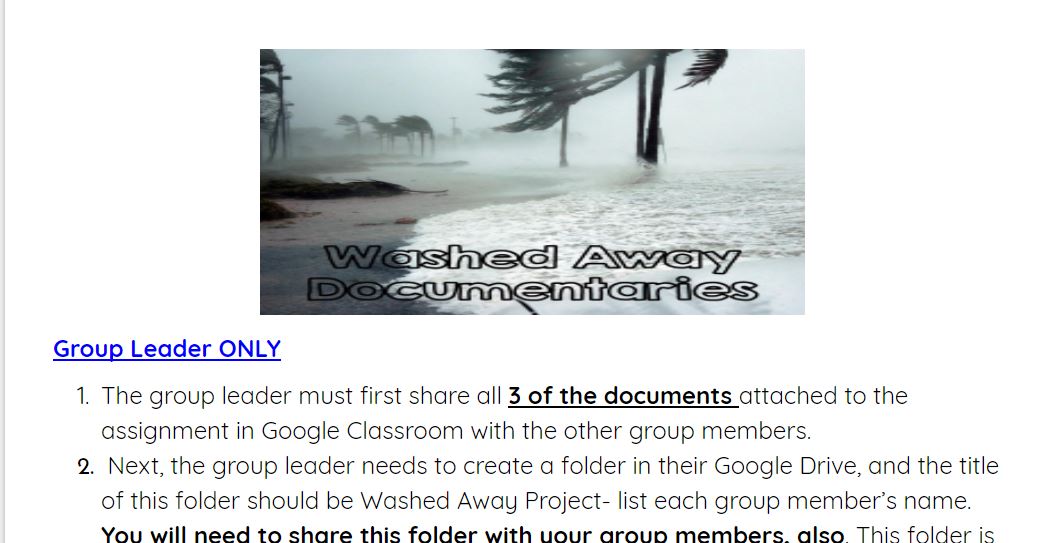
My class recently started a unit we call, “Washed Away,” which is based on realistic fiction novels about Hurricane Katrina.  Within this unit, students would be reading a realistic fiction novel called, Upside Down in the Middle of Nowhere by Julie T. Lamana, which is about a family who experienced Hurricane Katrina.  I knew that my students, being 11 and 12 yr olds, weren’t very familiar with the impact that this hurricane had on those that went through it.  With this in mind, I decided to begin the unit with informational texts that addressed this.  It was also a way for me to include nonfiction articles since the novel they would be reading was fiction.  This is a great way to promote critical thinking skills, and they were able to work through each activity at their own pace.  Then, I ended the unit with students creating documentaries.  By the way– if you’re interested in having your students create documentaries, check out my blog post for WeAreTeachers on 5 Steps to Creating Student Documentaries.   Before doing this, they completed a hyperdoc on documentaries, to give them a better idea of what they were, the characteristics, etc.

I typically assign the hyperdoc activities through Google Classroom.  However, you can also share this with students via your Google Drive account, Edmodo, by posting a link to your website or using another digital program.  You can access a FREE video on how to assign in Google Classroom here.

Here’s a sample of my Washed Away Documentary Challenge:

Save

Save

You can access a copy of this hyperdoc activity here.

I hope this post encourages you to try hyperdocs or another 21st-century learning tool!  This has totally adapted the way I teach.  It also shows that even after 13 years of teaching, there are always ways to grow and learn as an educator.  To see more of my tips and resources, visit my blog, Lit with Lyns!

https://www.teacherspayteachers.com/Store/Lit-With-Lyns Save
« Differentiating with Google Classroom
Google Classroom- Showing Students How to Access & Use »

Comments

  1. Sandy Kendell says

    at

    Hi Lyndsey! I enjoyed your post on hyperdocs! One quick question – I am looking for the Google Search Stories Video Creator you linked to. When I click your link, it goes to the Google Stories YouTube channel, but I don't see a way there to create a search story. Is there something I'm missing or another website I need to visit? Thanks in advance! ๐Ÿ™‚

    • Lyndsey says

      at

      Hi Sandy! Thanks for your question. Apparently, since I wrote this post, Google Search Stories Video Creator no longer allows new stories to be created. I have updated the blog w/ 2 other tools: Piclit and Slidestory. They're both free and easy to use. Thanks again for stopping by.

Search

Categories

Latest on Instagram

โ˜€๏ธ Keep your middle school students engaged until โ˜€๏ธ Keep your middle school students engaged until the VERY last day of school! ๐Ÿ”๐Ÿ“š Comment ESCAPE to have link sent straight to your inbox. 

This End of Year Digital Escape Room is the perfect way to review important ELA skills while still having FUN during those chaotic final weeks ๐Ÿ˜…

Students will work through engaging challenges focused on:
โœจ Reading Comprehension
โœจ Figurative Language
โœจ Student Reflection
โœจ Critical Thinking & Problem Solving

โœ”๏ธ Digital & Editable
โœ”๏ธ Grades 5โ€“8
โœ”๏ธ Zero Prep
โœ”๏ธ No Printing Needed

Your students will love the interactive format, and youโ€™ll love having an easy, meaningful activity that keeps everyone focused and learning ๐Ÿ™Œ

Perfect for review days, sub plans, enrichment, or end-of-year fun! ๐ŸŒด๐Ÿ’ป

#middleschoolela #elateacher #endofyearactivities #digitalescaperoom
โœจ Grammar just got a whole lot more fun! โœจComment โœจ Grammar just got a whole lot more fun! โœจComment GRAMMAR to have the link sent directly to your messages. 

These 8 Parts of Speech Posters are the perfect way to make grammar concepts clear, engaging, and easy for students to remember! ๐Ÿ“š๐Ÿ’ก

Each poster includes:
โœ”๏ธ The part of speech word 
โœ”๏ธ Student-friendly definition 
โœ”๏ธ Example word 
โœ”๏ธ Visual image support 
โœ”๏ธ The part of speech used in a sentence 

PLUS โ€” they come in BOTH ๐ŸŒˆ color and ๐Ÿ–๏ธ black & white options!

Perfect for:
โญ Classroom decor 
โญ Grammar walls 
โญ Interactive notebooks 
โญ Anchor charts 
โญ Student reference tools 

Your students will actually USE these all year long! ๐Ÿ™Œ

#middlegradesela #grammaractivities #partsofspeech #classroomdecor #anchorcharts
โœจ Make those last weeks of school meaningful AND e โœจ Make those last weeks of school meaningful AND engaging! โœจ  ๐‚๐จ๐ฆ๐ฆ๐ž๐ง๐ญ ๐‘๐„๐…๐‹๐„๐‚๐“ ๐ญ๐จ ๐ก๐š๐ฏ๐ž ๐ญ๐ก๐ž ๐ฅ๐ข๐ง๐ค ๐ฌ๐ž๐ง๐ญ ๐๐ข๐ซ๐ž๐œ๐ญ๐ฅ๐ฒ ๐ญ๐จ ๐ฒ๐จ๐ฎ๐ซ ๐ฆ๐ž๐ฌ๐ฌ๐š๐ ๐žs. 

Give your middle school students the opportunity to reflect on their year in a fun, student-centered way with this End of Year Student Reflection & Infographic activity! ๐Ÿ’ป๐Ÿ“ 

Students can: 
๐ŸŽ‰ Share favorite memories 
๐ŸŽถ Talk about favorite songs & TV shows 
๐Ÿ‘ฏ Reflect on friendships 
๐Ÿ’ญ Give feedback about what they liked or would change 
๐Ÿ“š Celebrate growth from the school year 

Perfect for keeping students engaged while still encouraging thoughtful reflection during the busy end-of-year season! 

โœ”๏ธ Digital & Printable 
โœ”๏ธ Grades 5โ€“8 
โœ”๏ธ Zero Prep 
โœ”๏ธ Meaningful + Fun 

This is the perfect activity for building classroom community, encouraging student voice, and ending the year on a positive note ๐Ÿ’– 

#middleschoolteacher #endofyearactivities #teacherlife #middlegrades #elateacher
Your students already LOVE creating storiesโ€ฆ now i Your students already LOVE creating storiesโ€ฆ now imagine turning their writing into illustrated books they can actually publish. ๐Ÿ“šโœจ

BuildMyStory makes it easy for students to transform their ideas into engaging, illustrated storybooks in just a few lessons โ€” while practicing standards-aligned reading and writing skills at the same time.

โœ”๏ธ Free to use
โœ”๏ธ Boosts creativity + engagement
โœ”๏ธ Standards-aligned
โœ”๏ธ Perfect for elementary & middle school classrooms
โœ”๏ธ Students become published authors ๐Ÿ’™

This is the kind of writing activity students beg to keep working on. ๐Ÿ™Œ

#TeachersOfInstagram #ELAteachers #TeacherTools #WritingWorkshop
Who can relate? Who can relate?
โœจ Make argumentative writing ENGAGING and easy to โœจ Make argumentative writing ENGAGING and easy to teach! โœจ๐‚๐จ๐ฆ๐ฆ๐ž๐ง๐ญ ๐ฐ๐ซ๐ข๐ญ๐ž ๐š๐ง๐ ๐ก๐š๐ฏ๐ž ๐ญ๐ก๐ž ๐ฅ๐ข๐ง๐ค ๐ฌ๐ž๐ง๐ญ ๐ญ๐จ ๐ฒ๐จ๐ฎ๐ซ ๐ฆ๐ž๐ฌ๐ฌ๐š๐ ๐ž๐ฌ.

This zero prep resource includes interactive drag-&-drop activities, argumentative paragraph examples, and skill-based practice that helps students confidently identify the key parts of argumentative writing.

๐Ÿ–Š๏ธ Students will practice identifying:
โœ”๏ธ Claims
โœ”๏ธ Evidence
โœ”๏ธ Counterclaims
โœ”๏ธ Transition words for counterclaims & rebuttals

Whatโ€™s included:
๐Ÿ“š Thesis Statements & Evidence activities
๐Ÿ’ป Claims & Counterclaims drag-&-drop activities
๐Ÿ“ Argumentative paragraph example
๐Ÿ” Paragraph analysis practice
โœ… Answer keys included
๐Ÿ–จ๏ธ PRINT + DIGITAL versions included

Perfect for middle school ELA and easy to use for whole group, stations, independent practice, or review!

#middle schoolela #argumentativewriting #elateacher #teacherspayteachers #digitallearning
โœจ End of the yearโ€ฆ but your students are still lea โœจ End of the yearโ€ฆ but your students are still learning! ๐Ÿ™Œ ๐‚๐จ๐ฆ๐ฆ๐ž๐ง๐ญ ๐„๐ง๐ ๐ญ๐จ ๐ก๐š๐ฏ๐ž ๐ฅ๐ข๐ง๐ค ๐ฌ๐ž๐ง๐ญ ๐ฌ๐ญ๐ซ๐š๐ข๐ ๐ก๐ญ ๐ญ๐จ ๐ฒ๐จ๐ฎ๐ซ ๐ฆ๐ž๐ฌ๐ฌ๐š๐ ๐ž๐ฌ!!!

Keep your middle schoolers engaged (without the chaos ๐Ÿ˜…) with these 10 End of Year Mini-Projects โ€” available in digital + printable formats!

๐Ÿ“ Each project includes a meaningful writing component
๐Ÿ’ป Editable PowerPoint included โ€” customize with ease!
โฑ๏ธ ZERO prep (because youโ€™ve done enough already!)

Perfect for those last few weeks when attention spans are low but you still want purposeful, standards-aligned activities ๐Ÿ’ก

Your students will stay engaged, reflect on their year, and actually enjoy learning right up to the last day ๐ŸŽ‰

#middleschoolELA #teacherlife #endofyearactivities #elatips #teachersofinstagram

Copyright © 2026 ยท Becca Paro Design Co.